A student’s journey from inquiry to enrollment touches four or five different teams inside a typical educational institution. A counselor handles the first call. A marketing team manages the campaigns that brought the student in. A finance team collects the application fee and reconciles payments. An academic evaluator scores a personal interview. A management team tracks the funnel from above.
Each of these roles needs access to parts of the same student record. None of them should see everything. A counselor calling a student back needs their name and phone number. A finance officer reconciling a fee transaction needs the payment reference and bank settlement data. An evaluator scoring a GD round needs the candidate’s academic profile and scorecard fields. A management team member reviewing funnel performance needs pipeline and conversion data.
If everyone logs in to the same CRM and sees the same screen, the institution has either over-shared sensitive data or under-served the teams who actually need specificity to do their jobs.
This blog explains what role-based access in a CRM actually means, why it matters for data privacy and operational discipline, and how Meritto’s User Management, Data Masking, and permission-driven architecture handle this across every team.
What Role-Based Access Means in Practice
Role-based access control (RBAC) is the system by which a CRM restricts what each user can see, edit, and action based on the role they have been assigned. In well-implemented RBAC, access is not defined by individual user preferences but by a structured permission framework that maps roles to data visibility and functional capability.
For an educational institution, the relevant access boundaries typically look like this.
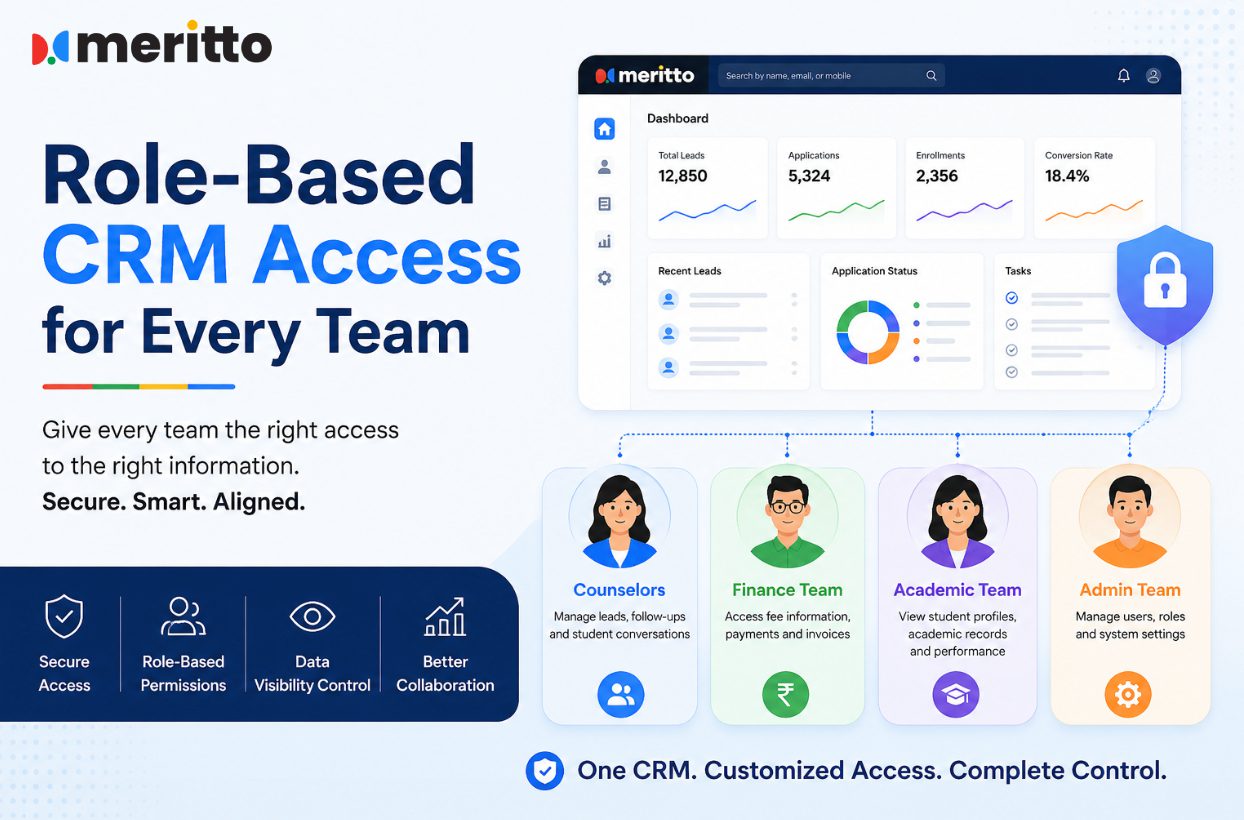
A counselor or sales representative needs to see the leads assigned to them, their contact details, their application stage, their interaction history, and their follow-up tasks. They should not see financial settlement data, evaluation scores from other panels, or data belonging to leads assigned to other counselors.
A marketing team member needs to see lead source data, campaign attribution, pipeline conversion by channel, and bulk communication tools. They do not need to see individual financial records or evaluator scorecards.
A finance team member needs to see fee collection status, payment history, settlement reports, and reconciliation data. They should not necessarily see full student contact information or confidential counselor notes.
An academic evaluator participating in a GD-PI process needs to see the candidate’s profile, the scorecard template for their session, and the fields relevant to their evaluation criteria. They should not see data from other evaluators or from stages they are not involved in.
A management team member needs a bird’s eye view of the enrollment funnel, conversion rates, counselor productivity, and campaign ROI. They may not need to act anything directly, but they need to see across all teams.
The challenge is that all of this data lives in the same system, connected to the same student record. The architecture that makes everyone’s work possible without exposing data inappropriately is role-based access.
Why It Breaks Down Without Proper Architecture
The most common failure mode is not a deliberate oversharing decision. It accumulates through defaults. A CRM is rolled out to the admissions team, configured for counselors, and then accessed by finance when they need payment data. Because no one set up role restrictions, finance can see the full counselor notes. Evaluators log in and see bulk applicant lists they are not supposed to take. Counselors at one campus can see leads belonging to another.
Three specific problems tend to follow.
Data privacy exposure. Student phone numbers, email addresses, and application details reaching team members who have no functional reason to see them creates a compliance and reputational risk. When data masking is not in place, every user becomes a potential point of leakage.
Accidental data modification. Without edit permissions tied to role, users can inadvertently update fields they should only be reading. A finance officer reconciling a payment should not be able to alter the application stage. An evaluator scoring an interview should not be able to modify a student’s lead status.
No audit trail. Without user activity logs tracking what each user did and when, the institution cannot investigate a data discrepancy or a privacy incident. “Someone changed this field” is an unanswerable question without session-level logging.
How Meritto Is Built for Role-Based Access
Meritto’s User Management system is built around three components that address these problems: Advanced User Manager, Advanced Data Masking, and User Activity Logs. Together they form what Meritto calls its Advanced User Management System.
Advanced User Manager
The Advanced User Manager allows administrators to create, manage, and secure login credentials for each user, then establish permissions that determine who can view, edit, and modify admissions data based on their departmental role.
The Meritto User Management page states this clearly: “Establish secure authorization of resources and manage user permissions i.e. who can view, edit and modify admissions data based on the departmental roles of the user.”
This means role configuration is not a workaround or an add-on. It is the primary mechanism through which every user’s access is defined. Permissions can be scoped to specific modules, specific data fields within those modules, and specific actions like viewing versus editing versus downloading.
For a higher education institution running enrollment across multiple campuses or departments, this also means branch-level and department-level data isolation. Counselors at one campus see their own leads. Head-branch management sees across all campuses. The data visibility structure mirrors the organizational hierarchy.
Advanced Data Masking
Data masking is the feature that allows sensitive fields to remain hidden from users who do not need them, even while those users perform legitimate functions on the same record.
Meritto’s User Management page gives a specific and telling example: “Counselors can make calls, marketing teams can send communications, finance teams can do reconciliation without accessing the applicants’ email address or phone number.”
That sentence describes three different roles performing three different tasks on what is, in the underlying data model, the same student record. The counselor making a call through the platform does not necessarily see the raw phone number displayed on screen. The marketing team sending a communication does not need to read the email address manually; the system handles the send. The finance team reconciling a payment sees transaction data without seeing personally identifiable contact details.
This is a materially different approach from simply restricting which screens a user can access. Data masking operates at the field level, which means a user can be fully functional in their role without the sensitive data that underpins that function ever being visible to them. It protects both student privacy and institutional compliance.
User Activity Logs
Meritto captures activity logs for every user session: every time a user adds, updates, or removes a user, group, or role, a log event is recorded. The logs also capture login history, downloads, and communication activity.
The platform states it captures 75,000+ daily user activity logs across its user base. For an institution, this means any data discrepancy, any unauthorized access attempt, and any policy violation has a traceable record. Accountability is not reliant on someone catching an error in real time. It is embedded in the audit trail.
What Each Team Actually Gets
The role-based architecture matters differently for each team. Meritto has dedicated pages for each major team role, and the access model in each case is distinct.
Counselors and sales teams. The CRM for Sales and Counseling Teams gives counselors their assigned leads, interaction history, follow-up tasks, and communication tools, scoped to their assigned pipeline. Data masking ensures they can engage with leads without necessarily seeing raw contact data they have no functional need to display.
Admission management teams. The CRM for Admission Teams provides a 360-degree central command for applications, with advanced search and filtering across the application pool and stage-level visibility. Access here is broader than a counselor’s but still scoped to the admissions function rather than financial settlement data.
Marketing teams. The CRM for Enrollment Marketing Teams gives marketing access to lead source data, campaign performance, audience segmentation, and communication tools. Role-based access means they can do action campaigns without touching individual financial records or counselor-level interaction notes.
Finance teams. The Finance Teams page describes a platform built specifically for fee collection management: extensive fee workflows, payment settlement in multiple bank accounts, reconciliation and settlement reports, GST and surcharge handling, and fee forecasting. Finance accesses what they need for their work. The fact that a student’s full application and counselor notes exist in the same system does not mean finance sees them.
Academic evaluators. The Online Scoring and Evaluation platform, used for GD-WAT and PI rounds, explicitly lists “Permission-driven Modules” as one of its four core capabilities. Evaluators are given access to candidate profiles and configurable scoring fields relevant to their session. The permission structure determines what they see during evaluation and prevents them from accessing data outside their scope. Different evaluators can use different scorecard templates based on their assessment role, and their access ends where their function ends.
IT teams. The CRM for IT Teams page covers ERP integration, system-level user configuration, and the technical controls that IT administrators use to govern the entire access architecture. IT teams manage permissions at the system level without needing to access the student-facing data that other teams work with.
Management teams. The CRM for Management Teams provides the bird’s eye view: real-time enrollment funnel health, campaign ROI, counselor productivity dashboards, and cross-campus performance benchmarking. Management visibility is broad but oriented toward aggregated performance data rather than individual student records.
The Relationship Between Access Control and Data Privacy
Role-based access and data masking are not just operational conveniences. They are the technical foundation for data privacy compliance in a student enrollment context.
Students share personal details, academic records, and financial information with an institution in trust. That trust carries an obligation: data should be accessible only to people who need it, only for the purposes it was provided, and only through channels that protect it from unauthorized use.
Meritto’s Security and Compliance framework addresses this at multiple levels. Role-wise data access is listed as a security feature alongside encryption, IP-based access restrictions, multi-factor authentication, and session monitoring. Data privacy is not treated as a separate concern from access control: they are the same system, operating from the same permission framework.
This matters particularly for institutions operating across India and the UAE, where data privacy obligations are active through India’s Digital Personal Data Protection Act and regional data governance frameworks. Role-based access and data masking are the platform-level mechanisms that make compliance operationally tractable, not just aspirationally stated.
The Practical Test
If you are evaluating whether a CRM genuinely supports role-based access across your institution’s team structure, the questions to ask in a demo are specific.
Can you show what a counselor’s login looks like versus a finance login on the same student record? Can sensitive fields be masked from users who do not need them without preventing those users from performing their function? Are user actions logged at the session level? Can branch-level or department-level data isolation be configured? Can academic evaluators be given access only to the evaluation module without seeing the broader CRM?
These are not edge cases. They are the standard operational requirements of any institution running enrollment across multiple departments, and the answers reveal whether access control is genuinely built into the platform or bolted on as an afterthought.
To see how Meritto’s User Management, Data Masking, and permission architecture works in the context of your institution’s team structure, the User Management page covers the full capability. The Admission Management Software overview is the starting point for seeing how the full platform connects inquiry to enrollment across all these teams.
To walk through this in a live demo, schedule a call with Meritto.
Meritto is a product of NoPaperForms Solutions Limited. Trusted by 1,000+ educational organizations across India, the UAE, and Southeast Asia. Learn more at meritto.com.
- Connected Intelligence: The Infrastructure Behind Institutional Agility

- More Data, But Less Insight? Inside the Intelligence Era of Education
- How universities can turn AI into real institutional impact
- Which CRMs Can Show Cost per Lead and Cost per Enrollment by Channel?
- How to Track Digital Marketing Agency Performance for Student Recruitment
- Admission Counselor Productivity: Tools to Track Performance Effectively